jMRUI Import/Export menu, version 3.0.1 Alpha
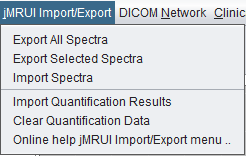
Current version 3.0.1 Alpha screenshot. The menu is still visible but should be considered legacy.
 spectrIm-QMRS
Version 3.0.1 Alpha
spectrIm-QMRS
Version 3.0.1 Alpha
Legacy menu - version 3.0.1 Alpha
The jMRUI Import/Export menu is a legacy bridge for exchanging spectra and quantification results with jMRUI. In version 3.0.1 Alpha these menu items are obsolete: spectrIm-QMRS now contains its own fitting engine, TDFDFit, so routine quantification no longer depends on a jMRUI connection.
This menu is kept temporarily for backward compatibility and for users who still need to understand older workflows. It should not be used for new version 3.0.1 Alpha workflows. The internal TDFDFit engine, including the new parallel pthread-TDFDFit implementation, replaces the older jMRUI exchange route for spectrIm-QMRS quantification.
The old website already noted that this functionality was limited because jMRUI used a 32-bit Java virtual machine, whereas spectrIm-QMRS requires a 64-bit runtime for practical memory use. In the current version, the more important reason is architectural: the application no longer needs jMRUI as an external fitting backend.
Current version 3.0.1 Alpha screenshot. The menu is still visible but should be considered legacy.
Obsolete. This command was intended to export the loaded spectra for use in jMRUI. New workflows should use the native spectrIm-QMRS export functions or the TDFDFit volume writer where structured exchange with the fitting engine is needed.
Obsolete. This command was intended to export only the selected spectra for external jMRUI processing. In version 3.0.1 Alpha, selected spectra can be processed and quantified directly inside spectrIm-QMRS using TDFDFit.
Obsolete. This command belonged to an exchange workflow where spectra modified or handled in jMRUI could be brought back into spectrIm-QMRS. This path is no longer recommended because the internal preprocessing, basis-set, and TDFDFit workflows keep the processing chain inside one application.
Obsolete. This command was used to import quantification results produced outside spectrIm-QMRS. For new studies, results should be generated by the internal TDFDFit engine, stored through the TDFDFit result store, and mapped or exported from the native result workflow.
Obsolete in the jMRUI sense. The command clears legacy imported quantification data and related fitted spectra/map state. New documentation should instead describe how to clear or reload native TDFDFit results.
To be checked manually: confirm whether this command still has useful behavior for native TDFDFit result cleanup before the menu is removed in version 3.1.
The replacement path is the native TDFDFit workflow: create or load a TDFDFit model, quantify spectra with TDFDFit or pthread-TDFDFit, inspect and map the fitted results, and export the results using the current TDFDFit result/export tools.
This keeps fitting, result storage, mapping, reporting, and batch processing inside spectrIm-QMRS and avoids dependence on an external jMRUI installation or 32-bit runtime.
The old jMRUI Import/Export help page referenced the common
spectrIm and EU project logos but did not include menu-specific
screenshots. The referenced legacy images have been copied into
assets/img/legacy/jmrui-import-export for
traceability.