Water removal
Suppress residual water components that can dominate proton spectra and interfere with later quantification.
 spectrIm-QMRS
Version 3.0.3 Alpha International
spectrIm-QMRS
Version 3.0.3 Alpha International
Current release: 3.0.3 alpha international for Windows and Linux. This guide retains earlier screenshots and version-specific descriptions. Their original version labels are preserved; appearance and window placement may differ in 3.0.3. See the release notes.
Improved in version 3.0.1 Alpha
spectrIm-QMRS uses HLSVD as a configurable preprocessing method for removing dominant nuisance components and improving spectra before fitting. In version 3.0.1 Alpha, the workflow is integrated into the self-contained application package and can be used for water removal, lipid removal, broad component removal, artifact suppression, and denoising.
The HLSVD functionality is based on a compiled original Fortran 77 algorithm, connected to spectrIm-QMRS through a Python interface layer. This keeps the proven numerical implementation available while allowing the Java application to apply it as part of a modern MRS(I) processing workflow.
HLSVD models the signal as a sum of damped complex exponentials. Components selected by the user can then be reconstructed and subtracted, or used to produce a cleaner representation of the spectrum. The method is commonly used in magnetic resonance spectroscopy for suppressing strong water components and other unwanted resonances before metabolite fitting.
The original HLSVD method was developed in the Delft spectroscopy tradition. A key reference is Pijnappel, van den Boogaart, de Beer and van Ormondt, SVD-based quantification of magnetic resonance signals.
For version 3.0.3 alpha international packaging on Windows and Linux, bundled runtime details, and HLSVDPro defaults, see the HLSVDPro configuration page.
Suppress residual water components that can dominate proton spectra and interfere with later quantification.
Reduce lipid contamination where broad or strong lipid signals disturb the metabolite region of interest.
Identify and remove broad baseline-like signal components when they obscure clinically or scientifically relevant peaks.
Help remove smiley artifacts related to oversampled point removal or similar preprocessing effects.
Use selected HLSVD components to improve spectral clarity before visual review, fitting, or map generation.
Open MRS or MRSI data and inspect the spectrum before preprocessing.
Select whether HLSVD should remove water, lipid, broad components, artifacts, or noise.
Tune the user-adjustable parameters for the current dataset and intended processing goal.
Apply the correction, review the result, and continue toward fitting, quality control, or reporting.
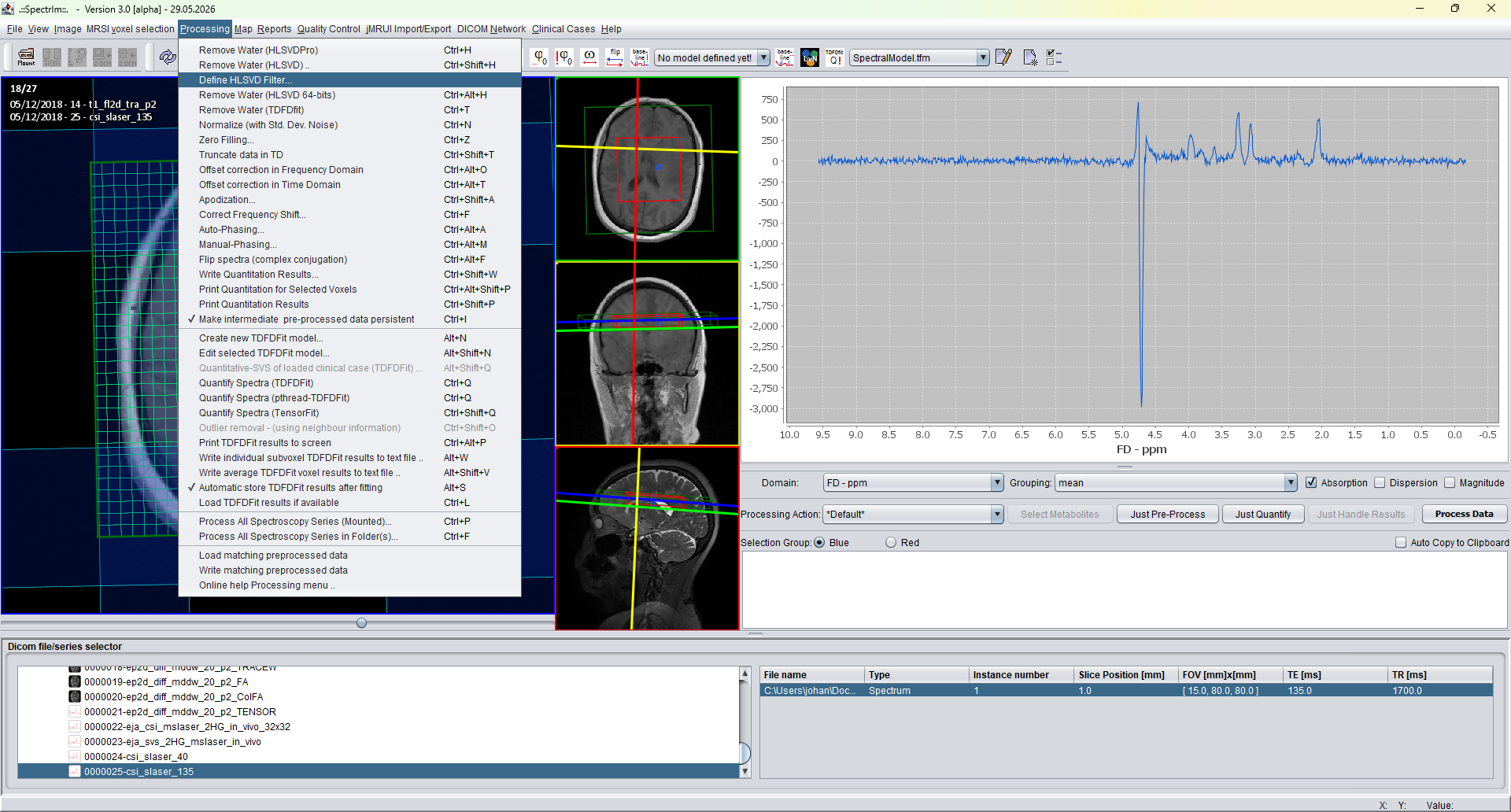
The new HLSVD filter workflow is opened from Processing > Define HLSVD Filter.... This route is the preferred version 3.0.1 Alpha interface for defining the HLSVD workflow before applying it to selected spectra.
The HLSVD filter definition window separates spectral presets, denoising settings, workflow order, and live spectral preview. The workflow table makes the intended cascade visible. Instead of being a simple water-removal command, HLSVD prefiltering can now consist of five optional processing steps. Each step can be switched on or off, and the order in which the active steps are applied can be chosen for the dataset.
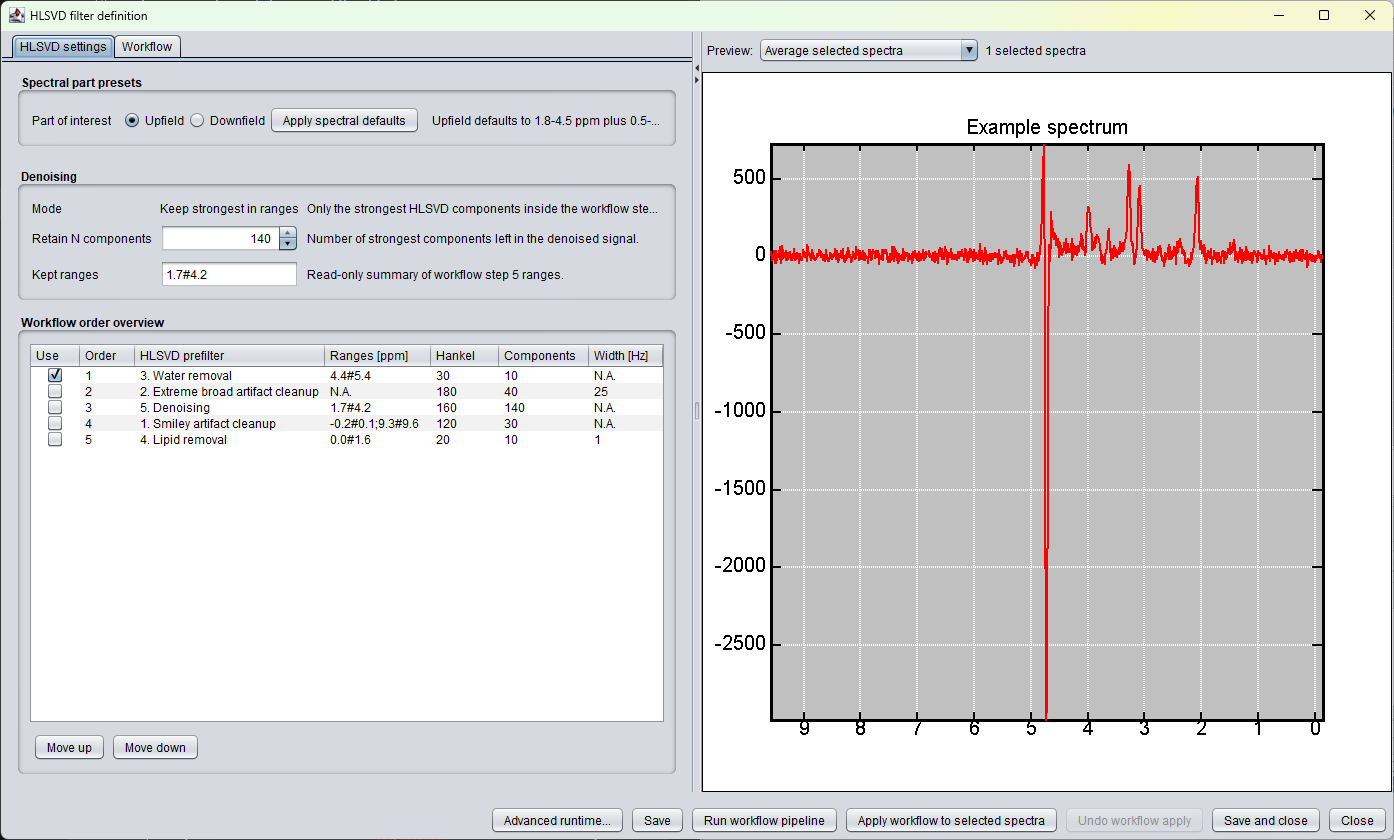
The redesigned GUI is built around the idea that HLSVD should be inspected before it changes measured data. The preview can show selected spectra or an average spectrum, so the effect of the workflow can be judged before applying it to the dataset.
HLSVD operations are represented as an explicit ordered table rather than as hidden defaults. This makes it easier to see which steps will remove water, broad artifacts, lipid contamination, smiley artifacts, or noise components.
A workflow can be saved and reused as a protocol-like preprocessing definition. This matters for MRSI studies, where the same prefiltering logic may need to be applied consistently across many selected voxels or datasets.
Applying HLSVD can be destructive when parameters are not optimal. The current implementation therefore reports progress during dataset application and provides a one-level undo for the last workflow application from the same frame.
The table below is an example of a five-step HLSVD workflow, not a universal recommendation. Enabled steps, order, ppm ranges, Hankel dimensions, component counts, and width thresholds must be adapted to the dataset and to the question under investigation.
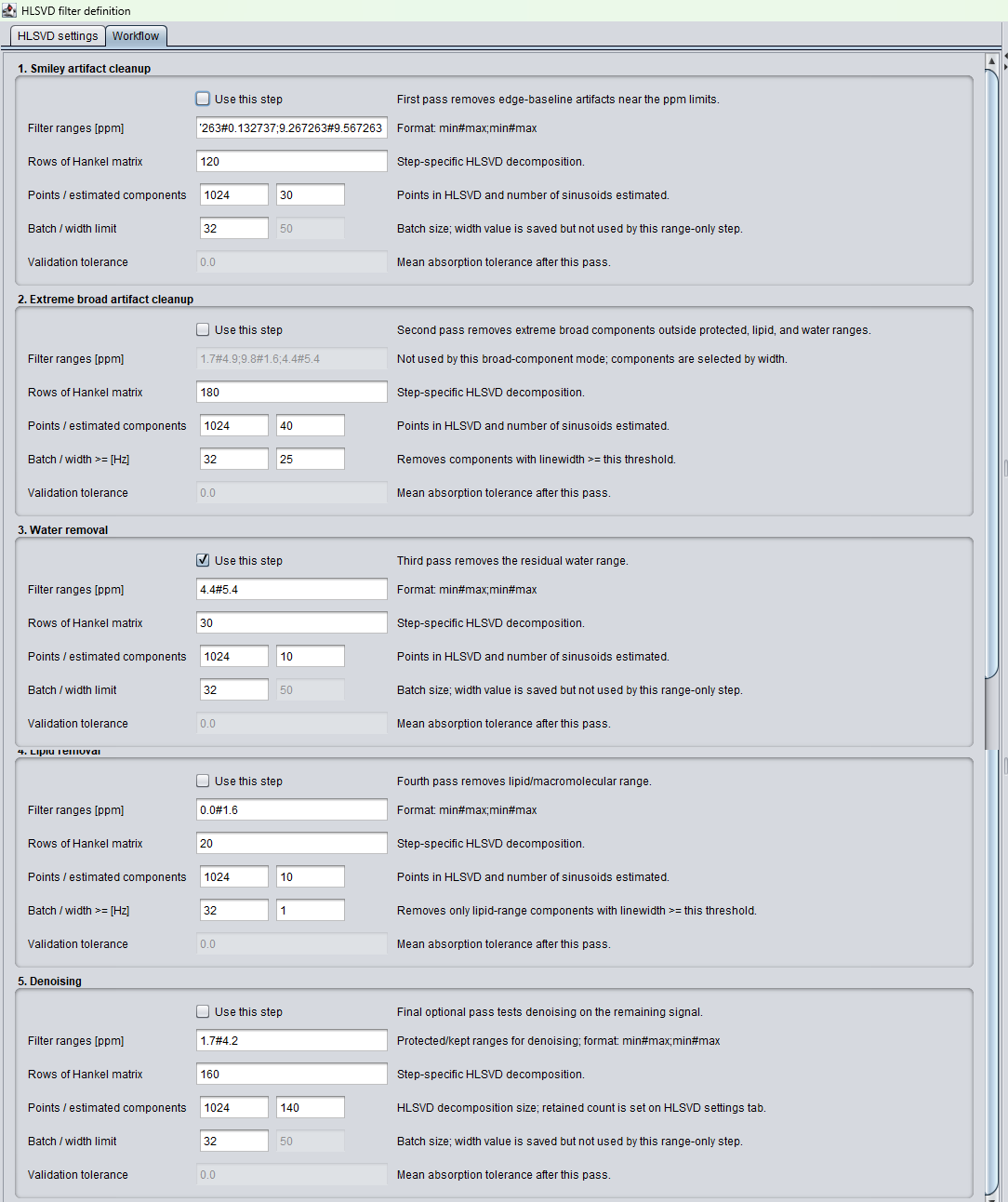
The Workflow tab presents each prefilter step as its own parameter panel. The composite screenshot shows the tabbed workflow editor only, with all five steps visible: smiley artifact cleanup, extreme broad artifact cleanup, water removal, lipid removal, and denoising.
Each panel contains a Use this step checkbox, step-specific ppm ranges, HLSVD decomposition settings, batch settings, and explanatory text. The right-hand preview remains visible while the user reviews or edits the workflow, so the selected spectra can be checked before running or applying the processing cascade.
HLSVD estimates a measured time-domain MR signal as a sum of damped complex exponentials. The classical method is described by Pijnappel, van den Boogaart, de Beer and van Ormondt in SVD-based quantification of magnetic resonance signals. In practical terms, the algorithm decomposes a noisy signal into a list of model components with amplitude, phase, frequency, and Lorentzian damping information. Components with selected properties can then be reconstructed and subtracted from the original signal.
This is why spectrIm-QMRS treats HLSVD as a workflow rather than as a single command. Water, lipid contamination, broad motion-related components, edge artifacts, and denoising are not the same problem. They may require different ppm ranges, different numbers of estimated components, different Hankel matrix dimensions, and a different place in the processing order.
The Hankel matrix setting is especially important. A larger matrix can give the algorithm more room to estimate complex damped sinusoids, but it also increases computation time. After decomposition, the filtering rule decides which of the estimated components should be removed. This separation between decomposition and component selection is the reason that the same HLSVD machinery can support several distinct preprocessing tasks.
Water removal is the most familiar HLSVD use case. The decomposition is followed by a filter that subtracts all components resonating in the residual water region, typically around 4.5-4.9 ppm in proton spectra. The goal is to remove a dominant nuisance resonance without disturbing metabolite signals needed for later TDFDFit or other quantification.
Some datasets contain very broad components that are not restricted to the water or lipid region. They can occur, for example, in the presence of patient motion or other acquisition instability. This step removes components whose estimated linewidth exceeds a selected threshold, independent of where the resonance occurs in the spectrum.
Denoising is intended as a final optional pass after stronger nuisance components have been handled. A further HLSVD decomposition is performed with settings chosen to retain the strongest components in the spectral region of interest. This can make spectra easier to inspect, but it is not recommended as a routine preprocessing step for quantitative fitting unless it has been carefully validated. Aggressive denoising can remove real metabolite signal as well as noise.
Smiley artifacts can appear when oversampled data are removed incorrectly. They often produce large edge signals at the beginning or end of the spectrum. These components can obscure frequency-domain nonlinear least-squares fitting and may also affect time-domain fitting. The default ranges therefore target edge regions outside the main metabolite window.
Lipid removal is conceptually similar to water removal: HLSVD components in a selected lipid range are subtracted. If intense lipid contamination is present, this step should usually be early in the workflow, often first or second. In routine use it mainly targets the strong lipid components near 0.9 and 1.3 ppm, not unsaturated lipid resonances elsewhere in the spectrum.
HLSVD filtering is powerful, but it is not intrinsically safe. If the decomposition or the subsequent component-selection rule is not appropriate for the dataset, the filtered spectrum can acquire broad residual structures or artificial baseline components. Such artifacts may be hard to represent with frequency-domain models and can also disturb time-domain fitting.
For quantitative work, HLSVD should therefore be applied conservatively and reviewed visually before fitting. Water or lipid suppression may be useful when a dominant nuisance component prevents reliable fitting, but denoising should be treated as an exploratory option rather than a recommended default.
The following screenshots show a TE 40 ms spectroscopy dataset before HLSVD processing, during workflow application, and after HLSVD. The example illustrates why the preview, progress display, and undo button are important parts of the new implementation.
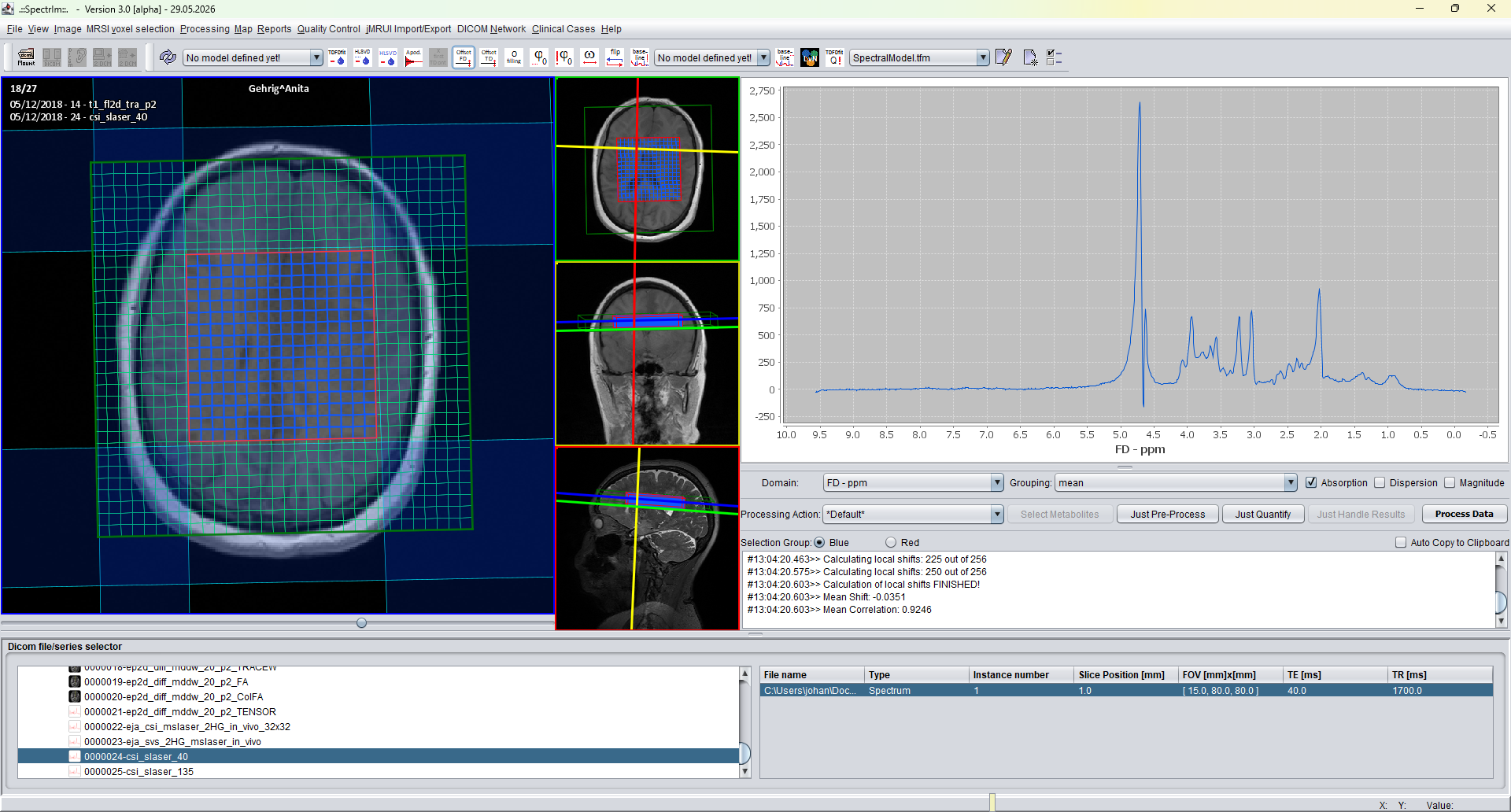
The original selected TE 40 ms dataset before applying the HLSVD workflow.
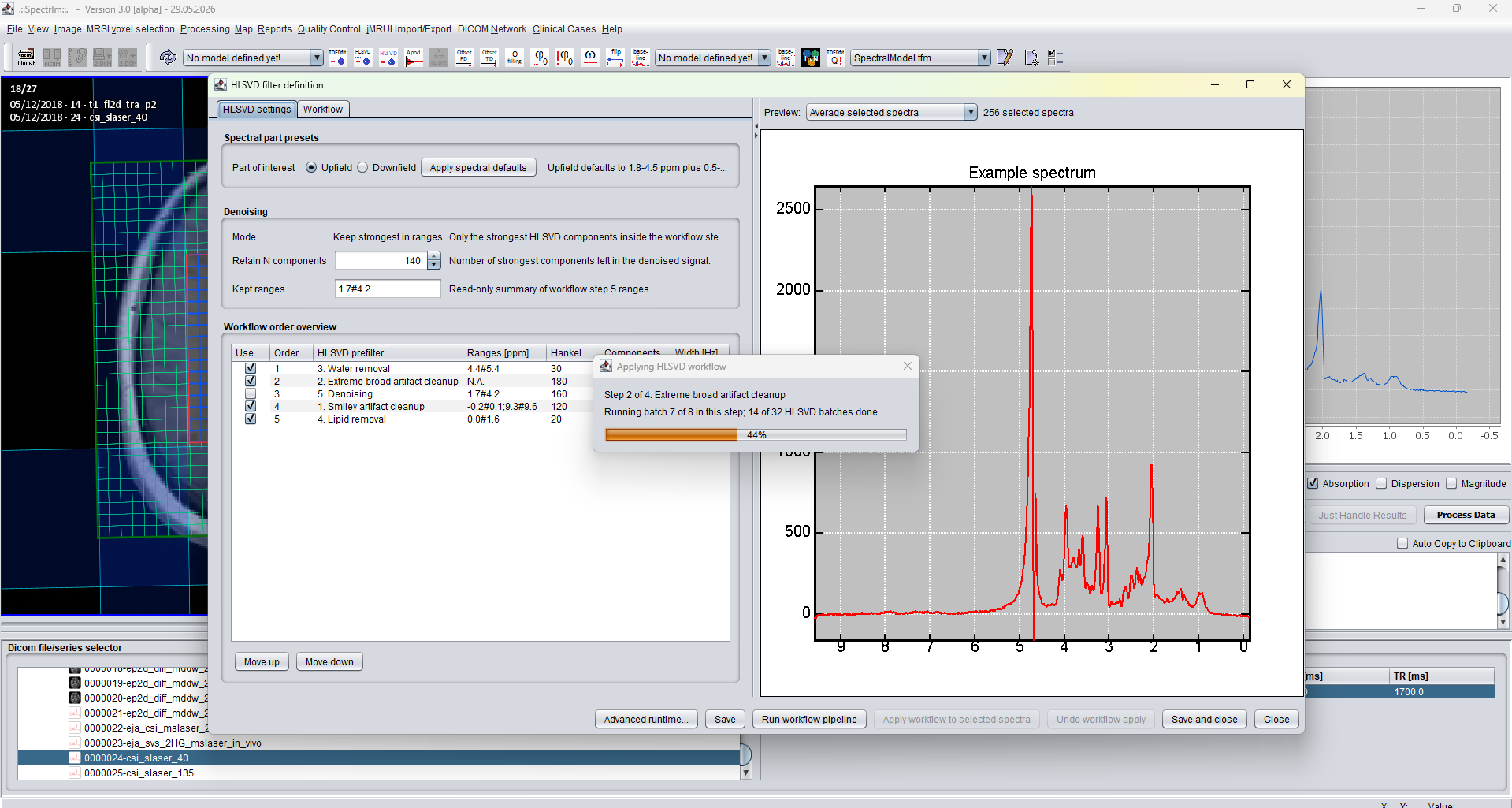
The progress dialog reports the active workflow step, batch number, and overall progress while selected spectra are processed.
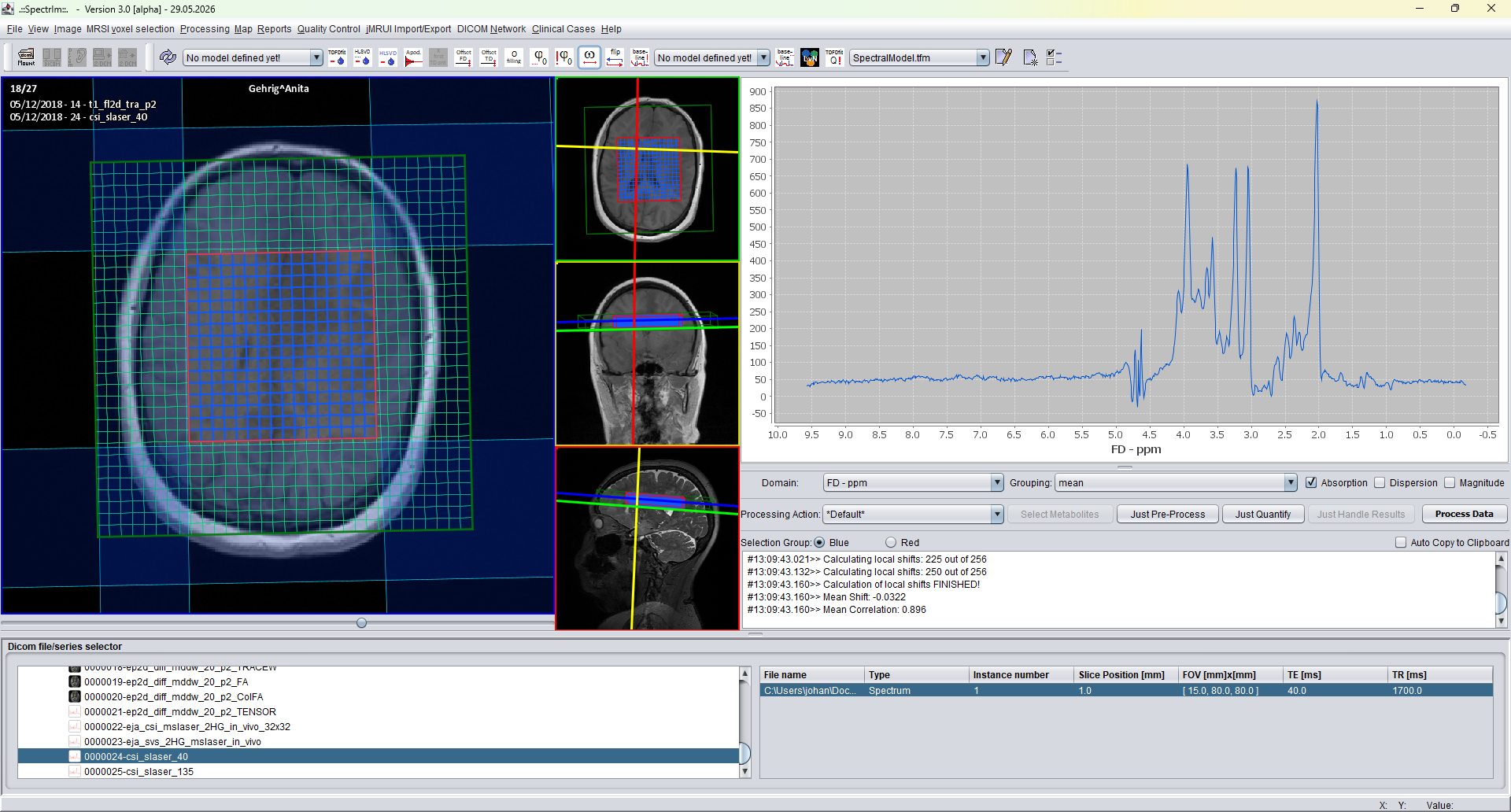
After HLSVD, the spectrum must be inspected for newly introduced broad residuals or baseline-like structures before proceeding to fitting.
| Enabled | Order | HLSVD prefilter | Ranges [ppm] | Hankel | Components | Width [Hz] |
|---|---|---|---|---|---|---|
| Yes | 1 | 3. Water removal | 4.4#5.4 |
30 | 10 | N.A. |
| Yes | 2 | 2. Extreme broad artifact cleanup | N.A. | 180 | 40 | 25 |
| Yes | 3 | 1. Smiley artifact cleanup | -0.2#0.1;9.3#9.6 |
120 | 30 | N.A. |
| Yes | 4 | 4. Lipid removal | 0.0#1.6 |
20 | 10 | 1 |
| Yes | 5 | 5. Denoising | 1.7#4.2 |
160 | 140 | N.A. |
To be expanded: add practical examples for choosing the Hankel matrix size, retained component count, width threshold, and workflow order for typical SVS and MRSI datasets. The example above is intentionally illustrative and should be adapted case by case.
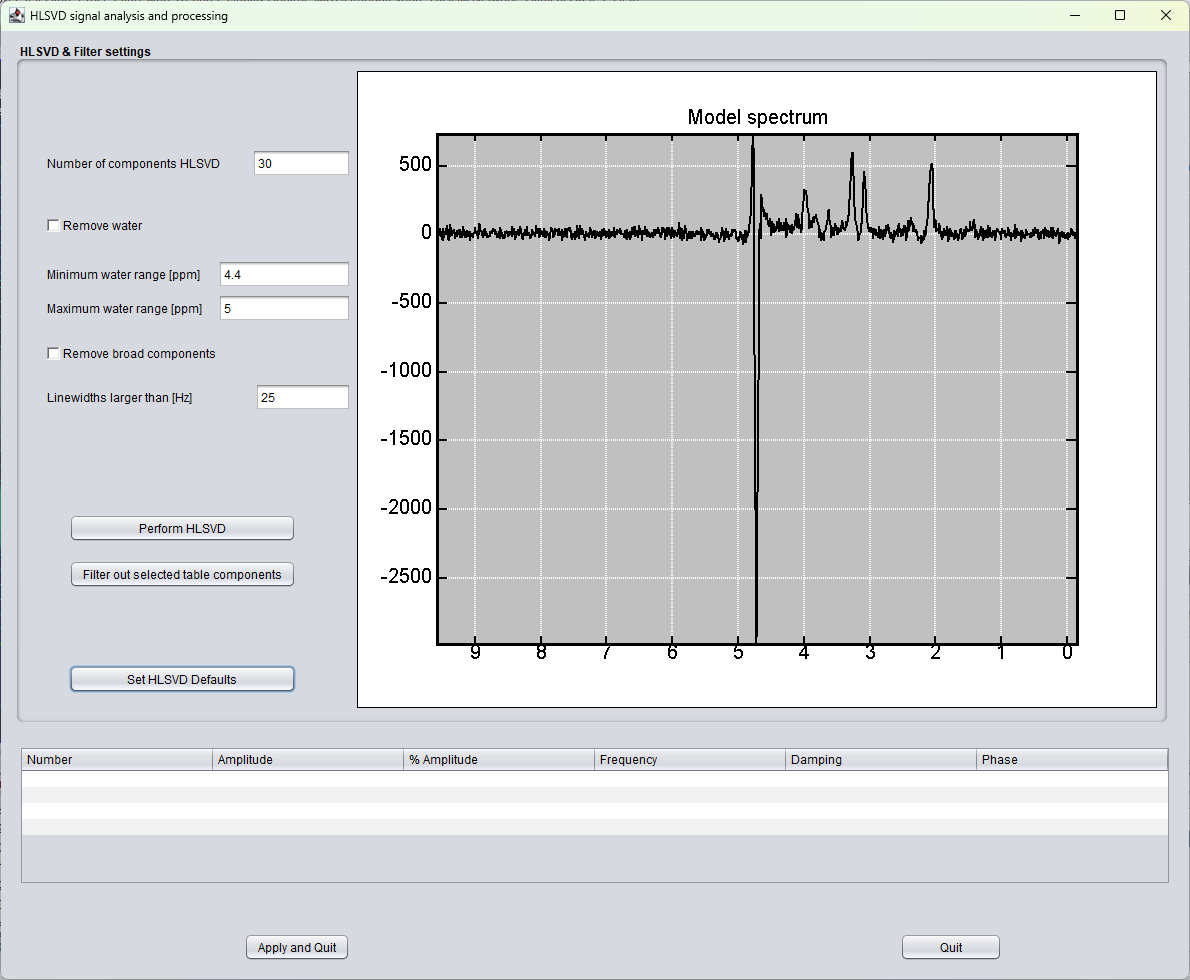
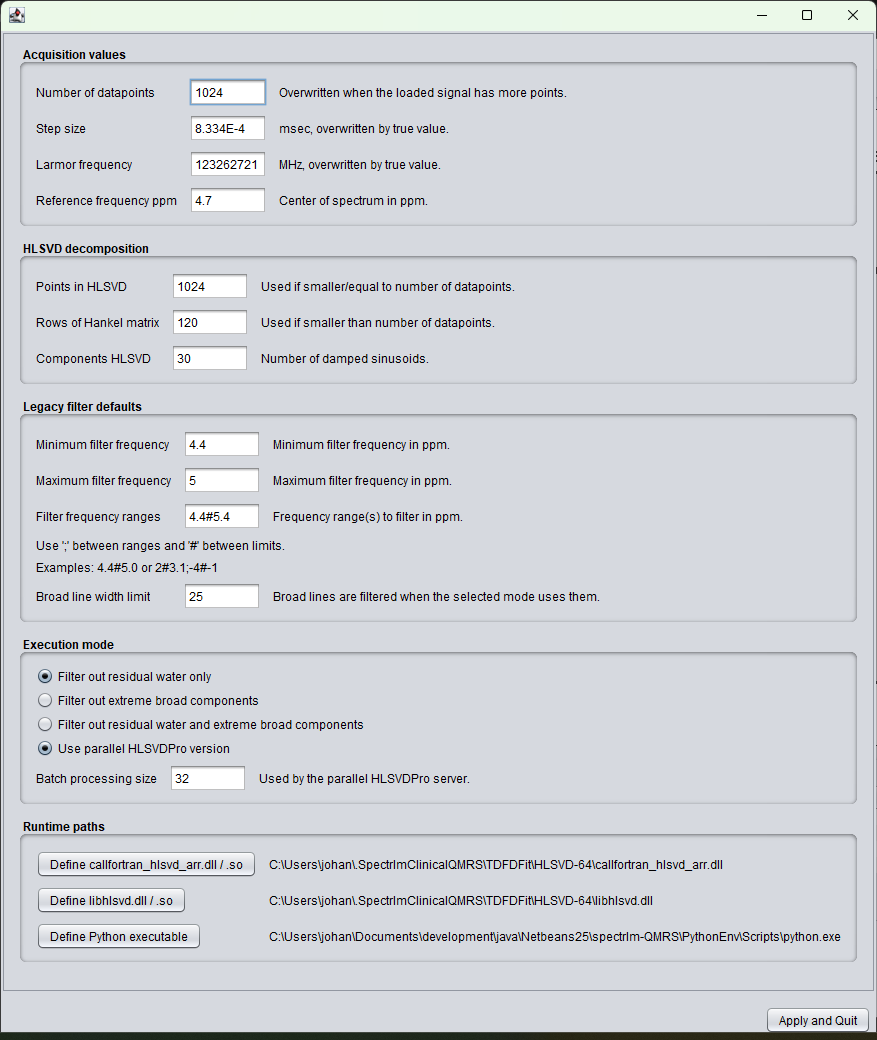
The older HLSVD signal-analysis and runtime-settings windows are still present in version 3.0.1 Alpha for compatibility, but should be regarded as legacy interfaces. They are planned to be removed in version 3.1, where the redesigned HLSVD filter-definition workflow will become the documented route.
This older window exposes component count, water range, broad component filtering, and a component table in one dialog. It is retained only as a transitional interface.
This older configuration window exposes acquisition defaults, HLSVD decomposition settings, legacy filter defaults, execution mode, and runtime paths. In the self-contained v3 package these paths should normally not require clinical user configuration.
HLSVD processing in spectrIm-QMRS is not a single fixed black-box operation. The settings can be adjusted by the user depending on the acquisition, the component to be removed, and the intended analysis. The detailed controls are part of the spectrIm-QMRS graphical user interface and will be described together with the processing menu and GUI documentation.