Current release: 3.0.3 alpha international for Windows and Linux. This guide retains earlier screenshots and version-specific descriptions. Their original version labels are preserved; appearance and window placement may differ in 3.0.3. See the release notes.
Version 3.0.3 Alpha International packaging
HLSVDPro enabling, runtime packaging, and configuration
Older spectrIm-QMRS documentation treated HLSVDPro as functionality
that might need separate enabling or local installation. Version
3.0.3 alpha international provides self-contained Windows ZIP and Linux TAR.GZ
packages: Java, Python, and the required HLSVD-related runtime
components are bundled with the application.
What changed in version 3.0.1 Alpha
The main user-facing change is that clinicians should not normally
need to install Java, Python, or HLSVDPro separately on a hospital
workstation. This is important in clinical environments where
local installation of external runtimes is restricted or
prohibited.
HLSVDPro is now part of the spectrIm-QMRS preprocessing workflow:
it can be called from the Processing menu and the main
preprocessing toolbar. The non-interactive HLSVDPro command uses
default settings, while the preferred configurable route is now
the version 3.0.1 Alpha HLSVD filter-definition workflow.
Platform-specific setup
Python 3.12, NumPy and SciPy are included in both packages. Do not substitute Windows executables into the Linux package or replace the bundled numerical libraries. Linux requires a graphical session and the system libraries used by Java/JavaFX. See the Windows instructions or Linux instructions and troubleshooting.
Where users access HLSVDPro
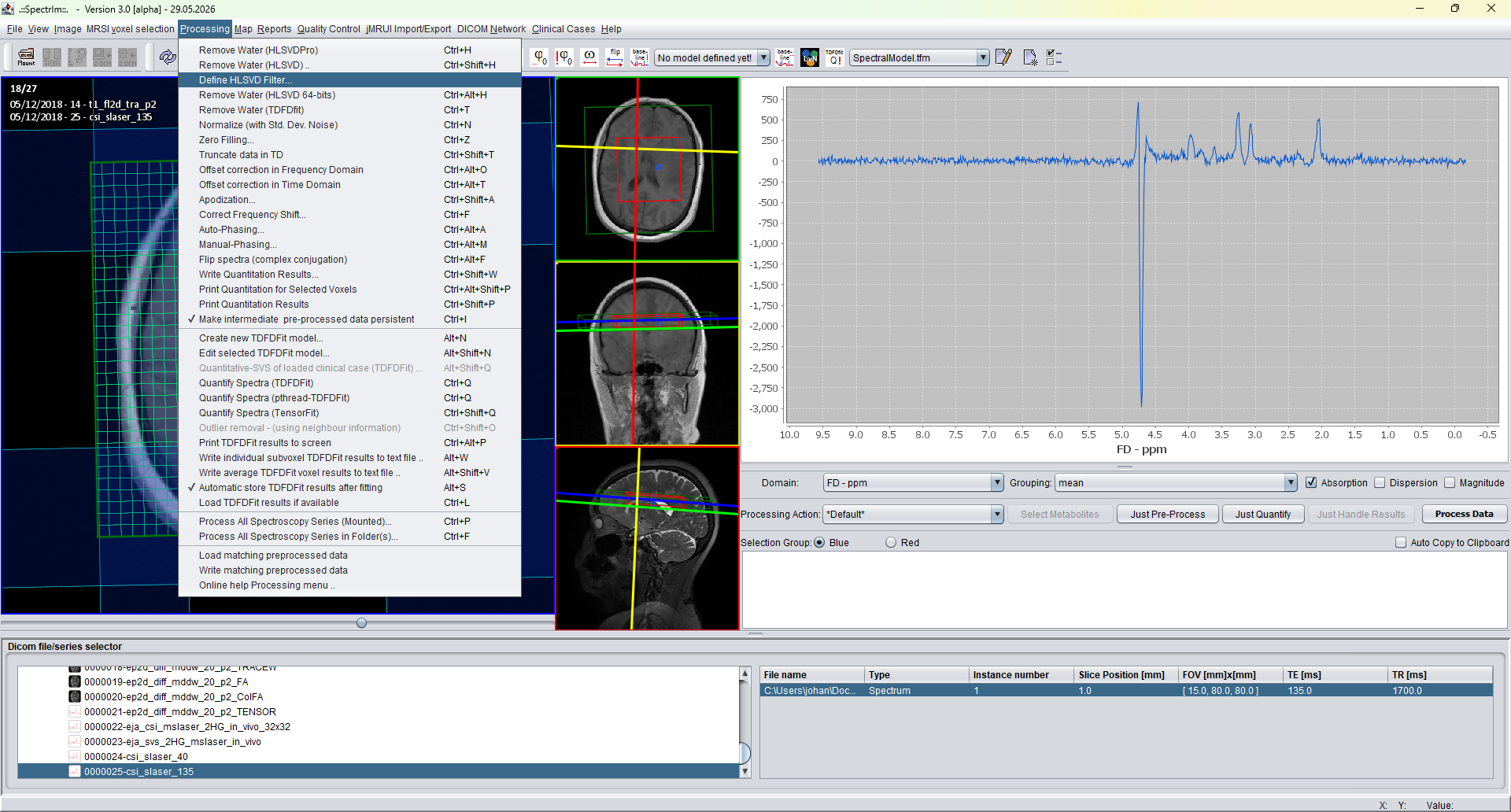
Processing menu
Processing > Remove Water (HLSVDPro)
applies non-interactive HLSVDPro water removal using the
current defaults. The same Processing menu also provides
interactive HLSVD, HLSVD filter definition, and the 64-bit
HLSVD implementation. For new v3 documentation, the most
important configurable entry point is
Processing > Define HLSVD Filter....
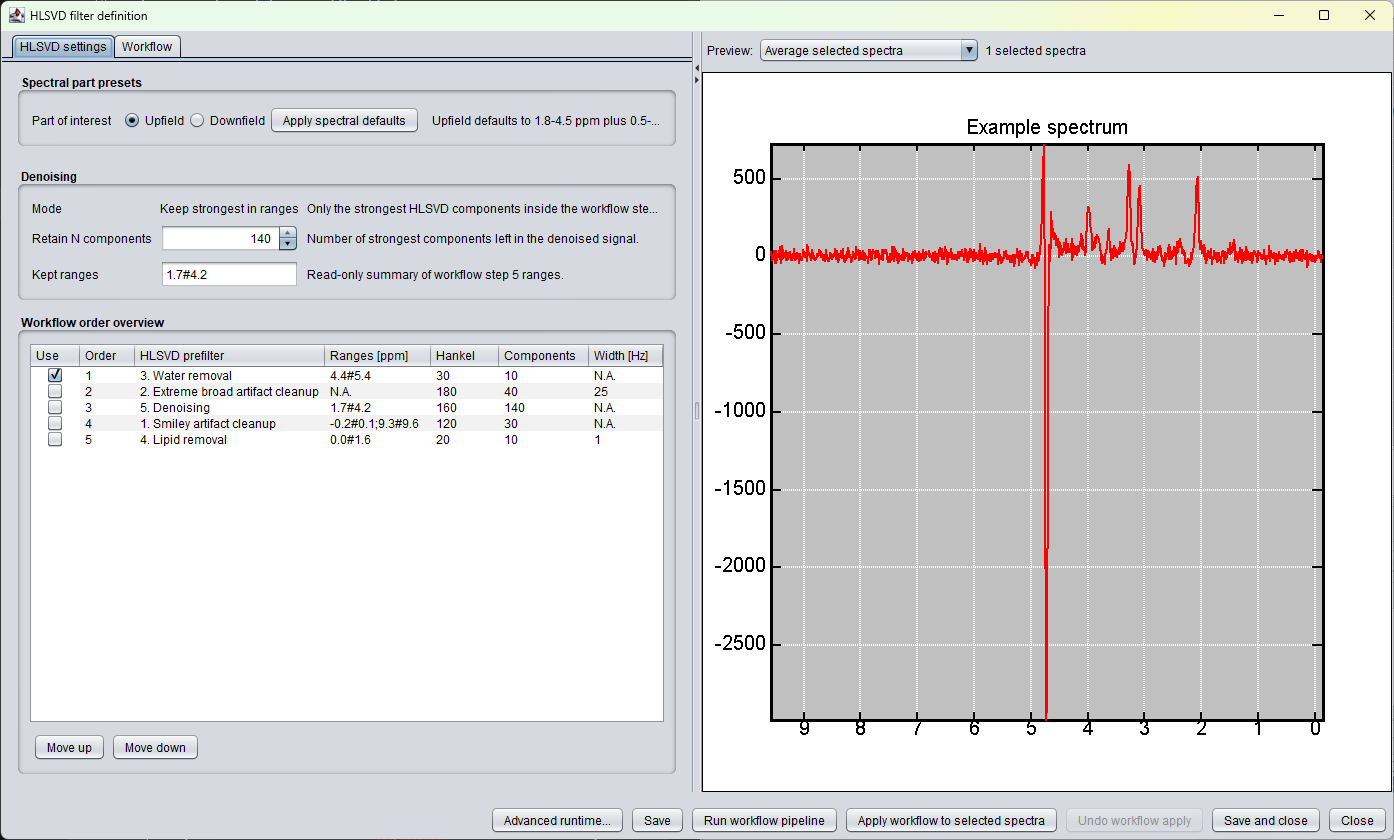
The new filter-definition window contains HLSVD settings,
workflow order, denoising options, and a spectrum preview. It
is the interface that should be documented for version 3.0
alpha and refined further for version 3.1. Its design goal is
to make HLSVD prefiltering visible and reversible enough for
practical work: preview first, apply the ordered cascade to
selected spectra, follow the progress, and undo the last
workflow application if the chosen parameters were not
appropriate.
HLSVDPro can also be represented as a batch-processing command
with lower limit, upper limit, and number-of-peaks parameters.
This is useful when the same preprocessing should be applied
repeatedly across datasets.
The following windows still exist in version 3.0.1 Alpha, but they are
retained for compatibility and transitional use. They should not be
treated as the primary documentation target for new users. The plan is
to remove or replace these legacy HLSVD windows in version 3.1.
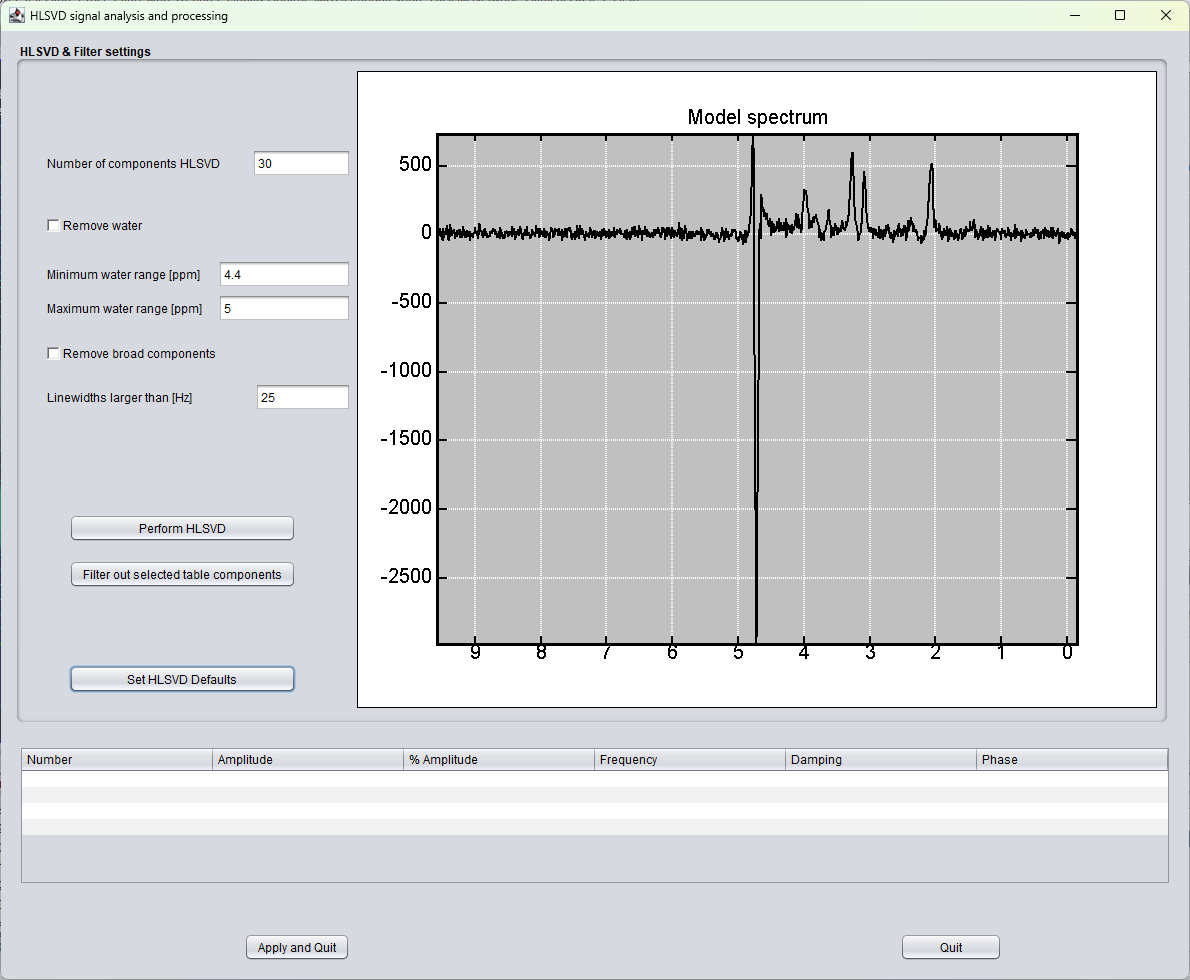
Legacy signal-analysis window
Older combined HLSVD analysis window with water range, broad
component filtering, component table, and direct apply/quit
controls.
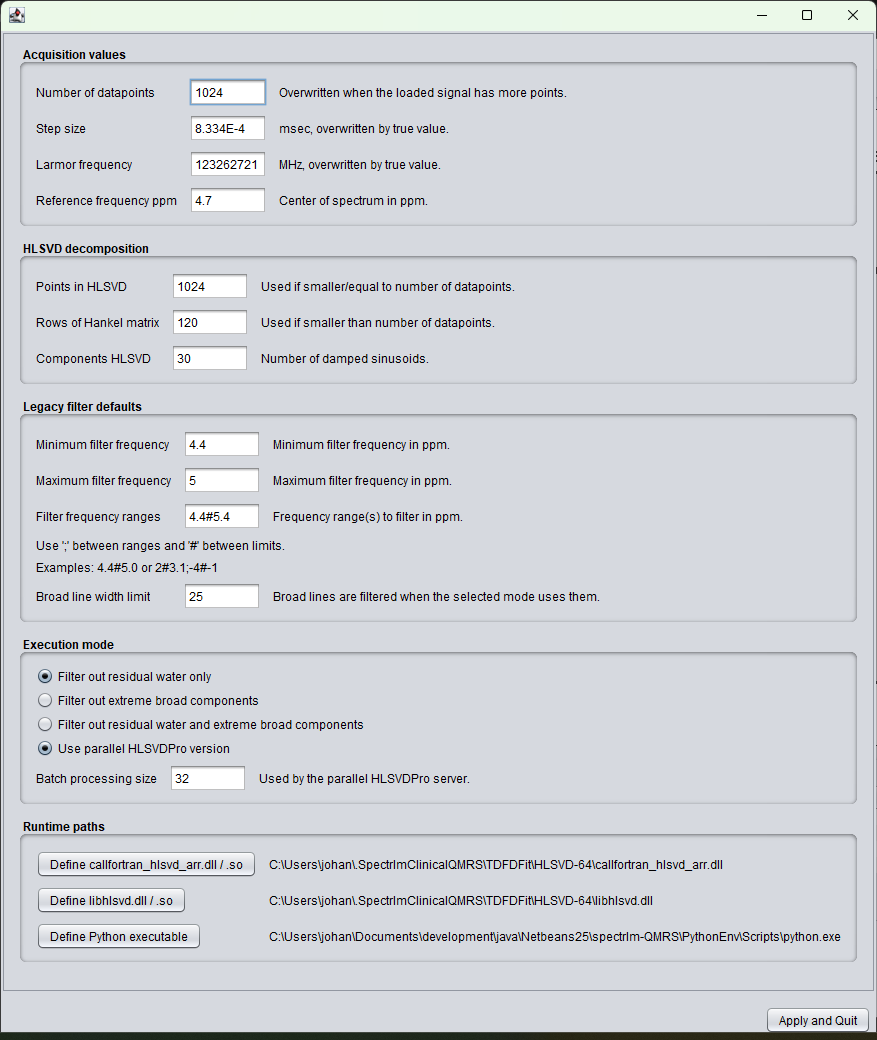
Legacy runtime-settings window
Older low-level settings window for acquisition defaults,
HLSVD decomposition parameters, legacy filter defaults,
execution mode, and runtime paths.
Important default settings
The current Java defaults show how HLSVD and HLSVDPro are initialized
when no user preference file exists. These values should be treated as
defaults, not universal recommendations; acquisition protocol, field
strength, nucleus, residual water behavior, and artifact type can all
require different settings.
Numerical HLSVD defaults
Number of HLSVD data points: 1024
Time-domain sample step size: 1
Hankel matrix size: 120
Number of sinusoids/components: 30
Default filter range: 4.4#5.4 ppm
Default filter type: Water only
HLSVDPro execution defaults
Default HLSVDPro mode: parallel
Serial mode remains available as a compatibility option
Default batch size: 32
Default maximum worker processes: 4
Extreme broad line-width limit: 50 Hz
Configurable filter types
Version 3.0.1 Alpha exposes HLSVD as a configurable preprocessing tool,
not only as a fixed water-removal button. The Java defaults include
several named filter modes:
Water and broad components
Water only
Extreme broad components
Water and extreme broad components
Range-limited broad components
Denoising modes
Denoise: remove weak outside ranges
Denoise: keep strongest in ranges
Denoise: remove weak components
Saved preprocessing cascade
The v3 code also defines a saved HLSVD preprocessing cascade with
ordered steps. HLSVD is therefore no longer documented only as a
water-removal tool: the workflow may contain water removal, extreme
broad artifact cleanup, denoising, smiley artifact cleanup, and lipid
removal. Each row can be enabled or disabled, and the order column
determines the sequence in which enabled rows are applied. The table
below is an example workflow and should be adapted to the case under
investigation:
Enabled
Order
HLSVD prefilter
Ranges [ppm]
Hankel
Components
Width [Hz]
Yes
1
3. Water removal
4.4#5.4
30
10
N.A.
Yes
2
2. Extreme broad artifact cleanup
N.A.
180
40
25
Yes
3
1. Smiley artifact cleanup
-0.2#0.1;9.3#9.6
120
30
N.A.
Yes
4
4. Lipid removal
0.0#1.6
20
10
1
Yes
5
5. Denoising
1.7#4.2
160
140
N.A.
The order column controls the cascade applied by the workflow. The
numeric prefix in the prefilter name is the internal filter type, so
the display can legitimately show, for example, order 1 with
3. Water removal. In this default configuration only water
all rows are enabled for illustration. This does not mean that all
rows should be enabled for every dataset.
The reason for separating these rows is that HLSVD first estimates
damped complex sinusoids and then subtracts only the components that
match the selected filter rule. Water removal, lipid removal, broad
component suppression, edge-artifact cleanup, and denoising therefore
need different ranges, component counts, Hankel settings, and sometimes
different positions in the workflow.
To be expanded: add practical default-setting recommendations for
typical SVS and MRSI datasets after more examples have been collected.
When configuration is still needed
For ordinary v3 alpha use, configuration should be minimal. Manual
checks are mainly needed when running a developer build, moving the
application folder after first launch, replacing bundled Python or
HLSVD binaries, or diagnosing a failed HLSVDPro call.
The old interactive HLSVD settings GUI should be considered
deprecated documentation-wise. It remains available in version 3.0
alpha for compatibility, but it is planned to be replaced
completely in release 3.1 by a redesigned configuration interface.
This deprecation concerns the old settings window only, not the
new HLSVDPro / denoising functionality.
Legacy HLSVD-64 settings still include DLL paths such as
callfortran_hlsvd_arr.dll, libhlsvd.dll,
and supporting runtime libraries. In the bundled v3 package these
should be placed relative to the spectrIm root and should not
require system-wide installation.
Related pages
HLSVD method overview
Algorithm background, denoising use cases, and reference to
the original Delft/Pijnappel HLSVD paper.